Backup Confidence Is a Liability: Rethinking Data Protection Before the Next Outage Hits
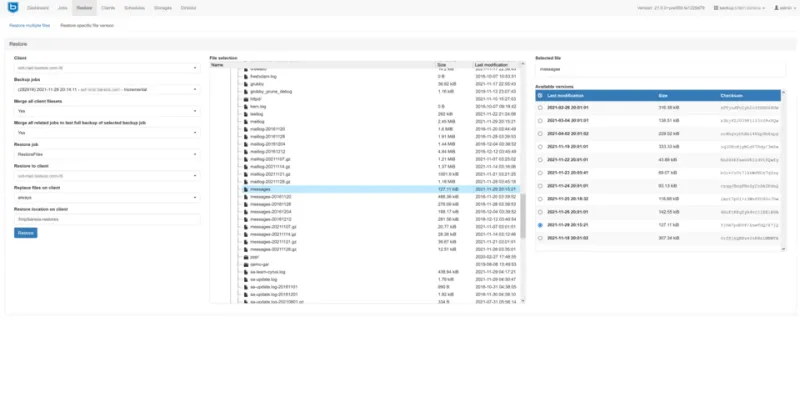
Photo: Bareos GmbH & Co. KG, CC BY-SA 4.0, via Wikimedia Commons
There is a particular kind of organizational overconfidence that IT professionals recognize immediately: the belief that because backups are running, data is safe. It is a comfortable assumption — and one that fails with remarkable regularity. According to a 2023 Veeam Data Protection Trends Report, 85 percent of organizations experienced at least one significant data recovery failure in the prior 12 months, despite reporting active backup programs. The backup was there. The data was not.
For US businesses managing increasingly complex data environments — spanning on-premises infrastructure, cloud platforms, and hybrid configurations — the gap between what a backup system promises and what it actually delivers has never been wider or more consequential.
The Fundamental Misconception: Backup Is Not Recovery
The most pervasive error in enterprise data protection is conflating backup with disaster recovery. A backup is a copy of data at a specific point in time. Disaster recovery is the operational capability to restore business function within a defined timeframe. These are related concepts, but they are not the same thing, and organizations that treat them as synonymous tend to discover the difference at the worst possible moment.
Consider a mid-sized financial services firm in the Midwest that maintained nightly backups of its core transaction database. When a ransomware incident encrypted production systems on a Tuesday afternoon, the team confidently pointed to the previous night's backup as their recovery path. What followed was a 72-hour ordeal: backup files stored on network-attached storage had also been encrypted, the off-site copy was two weeks old due to a misconfigured replication job no one had audited, and there was no documented recovery runbook. The firm recovered — eventually — but the operational and reputational damage was substantial.
This scenario is not an outlier. It is a pattern.
Where Backup Programs Quietly Break Down
Frequency assumptions that don't match data velocity. Many organizations set backup schedules based on legacy infrastructure assumptions — once nightly for databases, weekly for file systems. In environments where transactional data changes continuously, a 24-hour recovery point objective (RPO) can represent an enormous and unacceptable data loss. Organizations must map backup frequency directly to the actual rate of data change and the business cost of losing that interval of activity.
Untested restores. A backup that has never been restored is a hypothesis, not a guarantee. Backup files can become corrupted silently. Storage media degrades. Software versions change, introducing compatibility issues that only surface during a recovery attempt. Industry guidance consistently recommends quarterly restore testing at minimum, yet surveys indicate that fewer than half of US enterprises conduct scheduled recovery drills.
Backup storage that shares the attack surface. When backup repositories live on the same network segment as production systems, ransomware and other malicious actors can reach them just as easily as the primary data. Network-accessible backups that are not properly segmented offer the appearance of protection without the substance.
Vague recovery time objectives. An RPO defines how much data loss is tolerable. A recovery time objective (RTO) defines how long systems can be offline. Many organizations document these metrics during initial infrastructure planning and never revisit them as the business grows. An RTO of 48 hours that was acceptable for a 2018-era workload may be catastrophic for a 2025 operation with real-time customer commitments.
Emerging Technologies Raising the Standard
The backup technology landscape has evolved significantly, and two developments in particular are reshaping what best practice looks like for enterprise environments.
Immutable storage refers to backup targets configured so that data, once written, cannot be modified or deleted for a defined retention period — not by administrators, not by automated processes, and not by malicious actors who obtain elevated credentials. Object storage platforms from major cloud providers, as well as purpose-built on-premises appliances, now support immutability at the storage layer. For organizations facing ransomware risk, immutable backups represent a meaningful structural defense rather than a procedural one.
Air-gapped solutions take the isolation principle further. An air-gapped backup environment has no persistent network connection to production systems, making it physically or logically unreachable during an active attack. Implementations range from tape-based offline media — which has experienced a quiet resurgence in enterprise circles for exactly this reason — to cloud vaulting architectures that replicate data to isolated accounts with strict access controls and no direct network path from the primary environment.
Both approaches are increasingly referenced in compliance frameworks, including NIST's Cybersecurity Framework and guidance from the Cybersecurity and Infrastructure Security Agency (CISA), as components of a mature data protection posture.
A Practical Audit Checklist for Backup Health
Organizations seeking to assess their current posture honestly should work through the following questions with their data management teams:
- Are backup jobs monitored and alerting on failure? Silent failures are common. Confirm that failed or incomplete backup jobs generate actionable notifications.
- When was the last full restore test conducted, and was it documented? If the answer is unclear, schedule one immediately.
- Are backup repositories accessible from the production network? If yes, assess whether network segmentation or immutability controls are in place.
- Do current RPO and RTO values reflect current business requirements? Review these with operational stakeholders, not just IT.
- Is there an off-site or cloud-based copy of critical data that is current? Verify replication job health and confirm the age of the most recent successful off-site backup.
- Is there a written, tested recovery runbook? Documentation that lives only in institutional memory is not documentation.
- Are backup credentials and access managed separately from production credentials? Shared credentials create shared risk.
Moving From Backup Compliance to Recovery Confidence
The distinction matters: many organizations are backup-compliant — they check the box, they run the job, they store the files — but very few have tested and validated recovery confidence. The former satisfies an audit. The latter actually protects the business.
For database administrators and IT leaders managing critical data assets, the practical path forward begins with honest assessment. Assume the backup will be needed. Assume the restoration will be attempted under pressure, by someone who may not have been involved in the original configuration, during a period of operational stress. Design and test accordingly.
The organizations that recover cleanly from data loss events are not necessarily those with the most sophisticated tools. They are the ones that treated recovery as a first-class operational capability — not an afterthought to the backup job that runs quietly at 2 a.m.