The Last Server Room: A Phased Exit Plan for Businesses Leaving On-Premises Behind
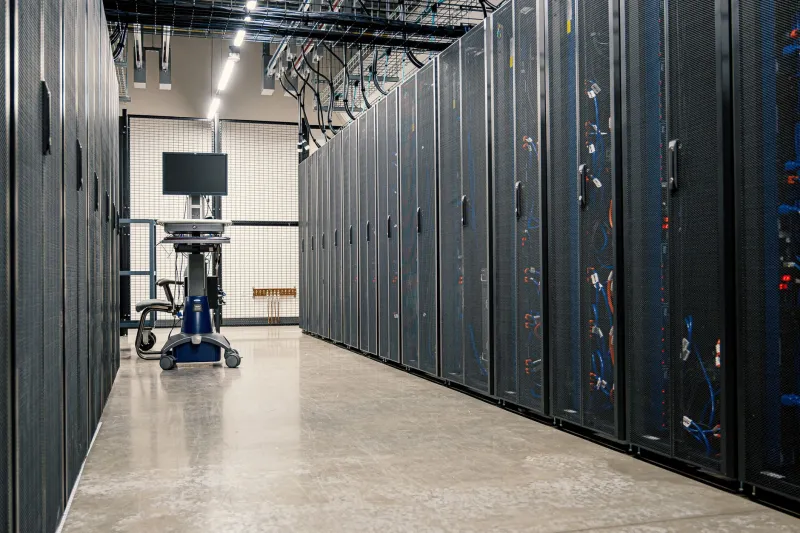
For many small and mid-sized American businesses, the on-premises data center has quietly become an anachronism — a climate-controlled room in the back of the office humming with hardware that will need replacing long before the lease on the building does. When that lease expires and leadership decides not to renew, the organization faces a deadline that is unforgiving in a way most IT projects are not. You cannot negotiate an extension on a landlord's patience forever.
What follows is a realistic, phased approach to closing the server room for good — one that accounts for the technical work, the vendor relationships, and the people who will spend their final weeks with that hardware.
Phase One: Inventory Before Ambition
The first mistake many organizations make is treating the exit as a cloud migration problem rather than an asset disposition problem. Before evaluating a single provider, catalogue everything. That means every physical server, every storage array, every network appliance, and — critically — every software license tied to hardware rather than users.
Businesses routinely discover during this process that a meaningful share of their footprint is already obsolete. Applications nobody remembers commissioning, archival systems that exist only because nobody dared touch them, test environments that outlived their projects by years. An inventory with a disposition column — migrate, retire, archive — frequently shrinks the migration scope by 20 to 30 percent before any vendor conversations begin.
Phase Two: Test the Network You Actually Have
Remote-first infrastructure is only as good as the connection to it. A business that has run everything in-house may never have needed to seriously evaluate its internet circuits for sustained, bidirectional data loads.
Start with a genuine latency and throughput assessment. Run application-level tests during business hours, not just off-peak speed checks. A file server that feels fine on a Tuesday morning may become unusable when a cloud-hosted equivalent adds 80 milliseconds of round-trip latency to every operation. Map applications against their latency sensitivity: email and document storage tolerate distance; line-of-business databases and VoIP do not.
Then address redundancy. A single fiber circuit with a cable-modem backup is not a remote-first architecture; it is a single point of failure with a footnote. Most US metro areas now offer multiple fiber providers, fixed wireless options, or both. Budget for diverse paths — physically separate entries into the building matter as much as separate providers.
Phase Three: Read the SLA Like a Contract, Because It Is One
Vendor service level agreements deserve more skepticism than marketing materials suggest. Three points deserve particular scrutiny:
- Uptime definitions. A 99.9 percent guarantee calculated on monthly availability, with exclusions for scheduled maintenance and force majeure, may be materially weaker than it appears. Ask what credits are actually payable and under what conditions.
- Support response versus resolution. A fifteen-minute response time is meaningless if resolution commitments are absent. For a business with no server room to fall back on, the SLA is the entire safety net.
- Data egress terms. Exit costs should be understood on day one, not during the next migration. Providers that make egress pricing opaque are telling you something.
Phase Four: Migrate in Waves, Not in a Weekend
Sequence the move by risk. Start with low-stakes, latency-tolerant workloads — file archives, development environments, backup targets. Use these early waves as live rehearsal: they will surface bandwidth constraints, permission gaps, and DNS oversights while the stakes are low.
Keep the most latency-sensitive and business-critical systems for last, and maintain a documented rollback path until each wave has run cleanly for a full billing cycle. Compressed timelines produce compressed testing, and compressed testing produces outages.
Phase Five: The Human Side of the Empty Room
The most neglected element of any on-premises exit is organizational. For many IT professionals, the server room is the center of their professional identity — the place where their expertise is tangible, visible, and immediately useful. Closing it can read, fairly or not, as a demotion.
Businesses that handle this well do three things. They redefine roles early, shifting titles and responsibilities toward cloud operations, vendor management, and security oversight before the hardware leaves. They invest in training budgets that match the new reality — certifications in cloud administration, not just vendor onboarding webinars. And they are honest about headcount: if the transition genuinely eliminates positions, staff deserve to hear that from leadership, not from a badge-reader deactivation.
There is also a practical knowledge-transfer problem. The person who knows which uninterruptible power supply trips first, or which legacy application breaks when a particular service restarts, holds institutional knowledge that no documentation fully captures. Schedule structured interviews with that knowledge before the room goes dark.
The Lease Expiry Is a Gift, If You Use It
A hard deadline strips away the indecision that stalls most infrastructure modernization. Businesses that treat the data center exit as a strategic reset — shrinking the footprint, renegotiating vendor terms, and retraining their teams — typically emerge with lower operating costs and stronger resilience than they had before. Businesses that treat it as a box-moving exercise tend to carry their old problems into new infrastructure and pay more for the privilege.
The server room's last day will come regardless. The only question is whether the organization arrives there deliberately or by accident.